From signup to your site, on day one

You run your business. We build, shield, and watch your website. Here's the whole journey, start to finish.

Guarded $99/mo Site + hosting + core protection Start with Guarded Fortified $199/mo Everything + WAF tuning + monitoring Get Fortified Tell us about your business Business name The web address you want Your colors & style revision 2: your call https://yourbusiness.com LIVE Encrypted. On your real domain. Something to text a friend on day one. bot swarm fake traffic flood break-in attempts password guessing vulnerability checks spam bots your customers walk right in BLOCKED THIS MONTH 0 UPTIME 100% RESPONSE TIME fast, every day
Step 1 of 6You sign upPick a plan. Two minutes, month to month, cancel anytime.

What you see along the way

Five moments, from checkout to live.

No project kickoff and no waiting on a designer's calendar. This is the whole process.

Minute three

A few questions, not a project brief

Right after checkout you are asked about your business in plain words. No logins or passwords are requested.

What is the name of your business?

Miller & Sons Auto

What do you do for customers?

Auto repair. Brakes, tires, and diagnostics.

Any colors you already use?

Illustration of the questions asked after checkout.
Day one

Watch it come together

Sign in to the customer portal with a code sent to your email. A setup card shows each stage as it finishes, and tells you if anything is needed from you.

Setting up your site

  • Payment confirmed
  • Your details
  • Securing your domain
  • Building your sitein progress
  • Email protection
  • Final checks
  • Going live

Illustration of the setup card in the portal.

Day one

Your first version, on a private preview address

It carries your name, your colors, and your services, and it works on a phone from the start. Only you can see it until you decide it is ready.

Illustration with a made-up business. Yours uses what you told us.

Whenever you like

Change it by typing

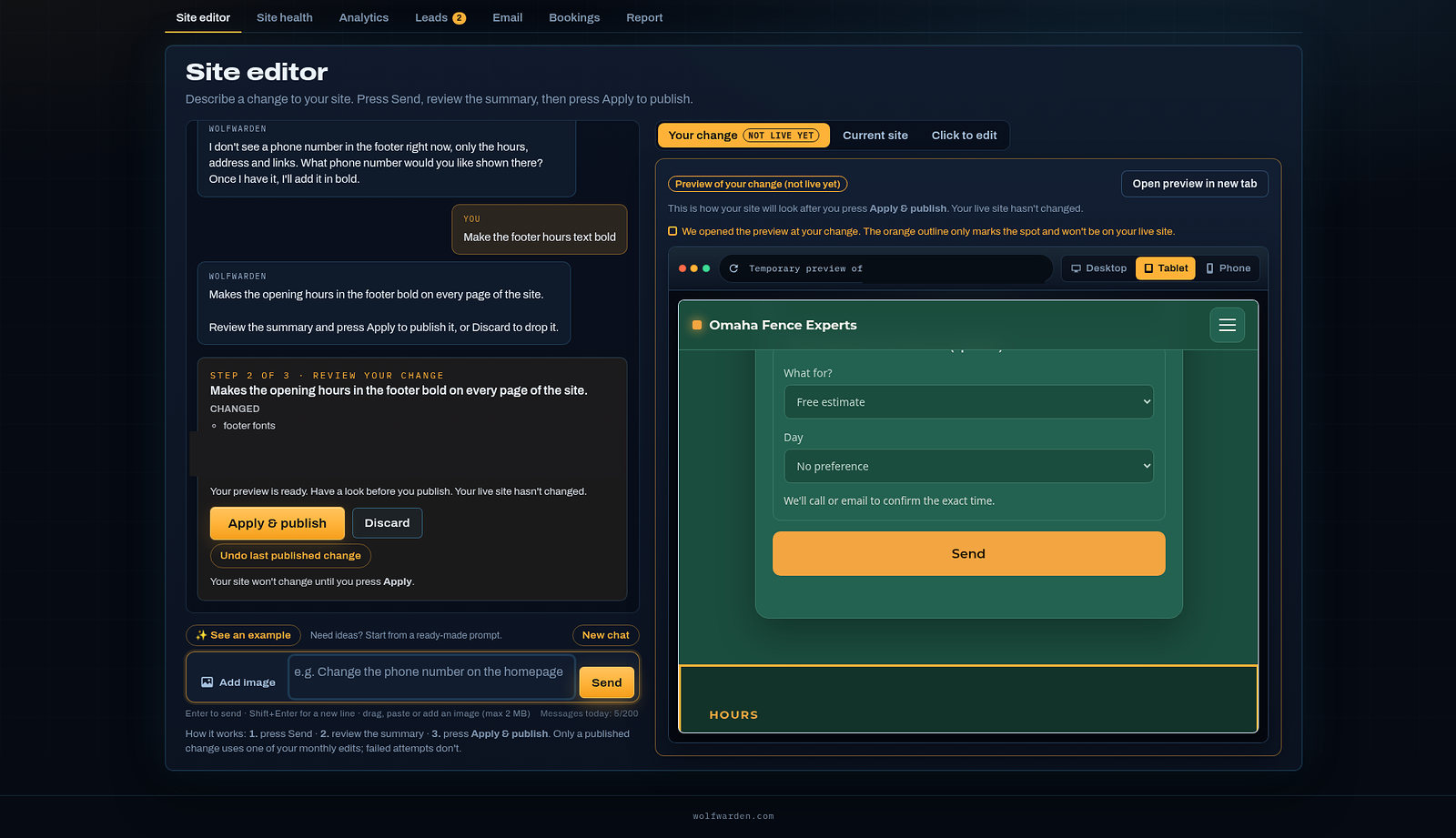
Type what you want changed, the way you would tell a neighbor. You see a preview on desktop, tablet, and phone, and nothing is published until you press Apply. A small change usually takes a few minutes from request to live.

The WolfWarden site editor: a typed request, a summary of the change, and a preview of the site with the change applied but not yet live.

The site editor. Sample view from a WolfWarden practice site. Select the image to see it full size.

When you are ready

Press Go live

If you already have a website, it stays up until you press the button. Then your own domain points at the new site, encrypted, and the daily watch begins.

Go livethenPublishingthenLive

Illustration of the Go live step in the portal.

After your site is live

A portal for changes, reports, and leads.

Describe a change in plain English, review a preview, and publish when it looks right. Monthly reports, leads, email drafts, and bookings live in the same place.

See the customer portal